You join a product team and one week after release a key user flow breaks for some customers payments time out, dashboards show inconsistent data, and support tickets spike.
That uncomfortable moment is where software testing proves its value: preventing those surprises or minimizing their impact.
In this guide I’ll explain what is software testing in practical terms, show the objectives you should chase in real projects, list the most-used types of testing, and give hands-on advice you can use immediately whether you’re preparing for interviews or writing your first test cases.
What is Software Testing – Simple Definition & Core Objectives
At its core, software testing is the activity of exercising an application to identify defects and to verify it meets requirements and user expectations.
The common objectives of software testing are practical and business-focused:
- Find defects early cheaper to fix during development than after release.
- Verify requirements ensure the product behaves as specified.
- Validate fit-for-purpose confirm the product solves user problems.
- Assess non-functional qualities performance, security, accessibility, reliability.
- Reduce release risk provide stakeholders with evidence and confidence.
According to industry standards and bodies like ISTQB, testing is a structured activity aimed at reducing risk and improving quality. Keep that risk-and-value mindset when planning tests.
Testing Levels Where Testing Happens
Testing is layered to catch different problems at the appropriate time.
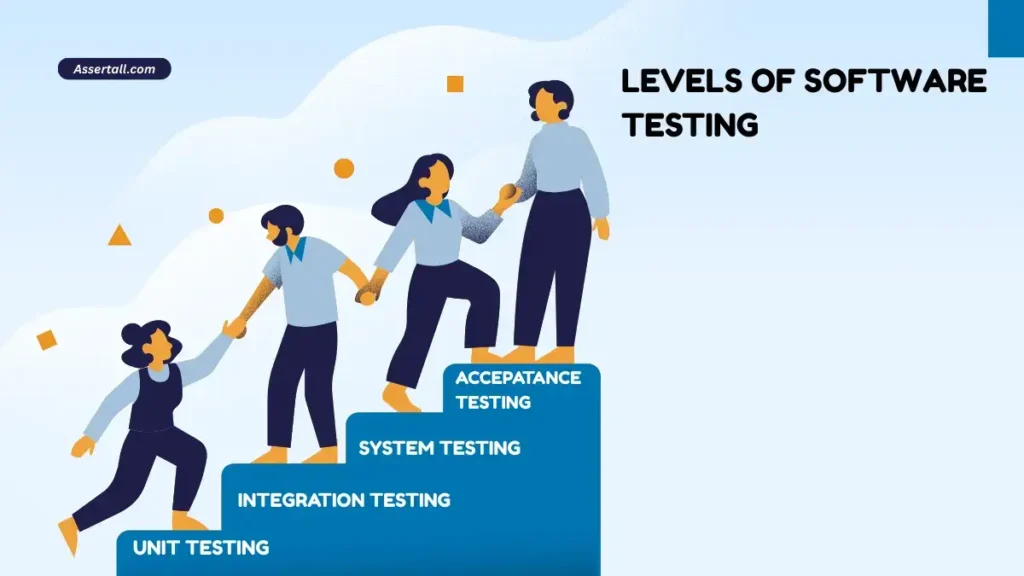
Unit Testing:
Done by developers. Fast and isolated. Ensures a function/class behaves correctly.
Integration Testing:
Verifies interfaces between components (service-to-database calls, API contracts).
System Testing:
Full system in a production-like environment. Verifies end-to-end flows.
Acceptance Testing:
Business or customer-driven checks (UAT). Confirms the product meets acceptance criteria.
Types of Testing Practical Overview
Below are the main types you’ll encounter in projects:
- Functional Testing: Confirms specific features work as expected (login, checkout). Example: verify a password reset email is delivered.
- Regression Testing: Re-run of critical tests after changes. Automation is often used here to save time.
- Smoke & Sanity Testing: Quick checks to decide whether a build is testable. Smoke is broad; sanity is focused.
- Performance Testing: Tests throughput, latency, and resource usage. Use tools like JMeter or k6 to simulate load.
- Security Testing: Vulnerability scans and penetration testing. OWASP resources are useful for practical checks.
- Usability & Accessibility Testing: Ensures the product is usable and accessible (screen readers, keyboard navigation).
- Exploratory Testing: Skilled testers use domain knowledge to discover unexpected issues. It’s high-value when requirements are incomplete.
Types of Testing Techniques
- Black box: test without internal knowledge user-focused.
- White box: test with code knowledge unit tests, security checks.
- Grey box: common in integration tests where you know some internals but test from a higher level.
When to Automate and When to Test Manually
Automation is a tool not a goal. Use it where it gives measurable value.
When to Automate
- Repetitive regression checks
- Smoke suites in CI
- Data-driven checks with many combinations
- Stable UI/API surfaces
When to Test Manually
- Exploratory testing and early feature discovery
- Usability and subjective checks
- One-off scenarios where automation cost > benefit
In real projects , the best teams combine automation for speed and manual testing for insight.
Test Cases & Scenarios
- Scenario: user completes checkout.
- Test case: specific steps and expected result.
Bug Report Template
A good bug report includes title, steps to reproduce, expected vs actual, environment, logs, screenshots, and severity.
Below is the sample real world Test Case Template
Test Case ID: TC_CHECKOUT_001
Title: Checkout with a saved card
Preconditions: User has a saved card & account active
Steps:
  1. Go to /cart
  2. Click Checkout
  3. Choose saved card
  4. Confirm payment
Expected Result:
  Order confirmation page with order id and status = paid
Real Project Scenario From Bug to Fix
Scenario:
A nightly ETL job intermittently fails, producing incomplete reports for a subset of users. Support tickets report missing data.
How to approach it:
- Reproduce locally or with a staging dataset.
- Capture logs and identify failing component (network timeout to third-party API).
- Write a flaky test that simulates the timeout using mocks.
- Work with developers to add retry/backoff and better error handling.
- Add a regression test and a health check in CI to detect recurrence.
This sequence demonstrates investigation → reproduce → fix → prevent the practical loop testers should advocate for.
Common Mistakes Testers Make
- Only testing happy paths and ignoring edge cases.
- Allowing flaky tests to persist in the suite.
- Poor bug reports missing repro steps or environment.
- Over-automating unstable UI elements.
- Not prioritizing tests by risk or business impact.
Practical Tips for New Testers
- Learn to read logs and application traces.
- Start with exploratory testing to understand workflows.
- Learn one programming language (Java or Python) enough to read and edit tests.
- Keep tests small and independent one assertion per test preferably.
- Use test data management: isolate test data and avoid shared mutable state.
Tools & Where They Fit
- Selenium / Playwright → UI automation for end-to-end flows.
- Postman / RestAssured → API testing and automation.
- JMeter / k6 → Performance testing.
- Jira → Issue tracking and linking bugs to releases.
- CI (Jenkins/GitHub Actions) → Run automated suites on every PR.
Tools support testing, but thinking and understanding risks matter more than tools.
Interview Angle How This Topic Is Asked and How to Answer
Common interview questions and concise answers, interviewer looks for clarity, not memorized answers.
Q: What is software testing?
answer: “Software testing is the practice of exercising and evaluating software to identify defects and ensure it meets requirements and user needs.”
Q: What are types of software testing?
answer: List the major types (unit, integration, system, acceptance) and give one sentence for each.
Q: When would you automate a test?
answer: repetitive, stable, high-risk, and high-value tests include an ROI sentence.
How to answer confidently
- Start with a one-line definition.
- Explain why it matters (risk reduction).
- Provide a quick example from your experience.
- End with the impact (faster releases, fewer rollbacks).
Sample interview-ready answer
“Software testing is verifying that the application meets requirements and validating it meets user needs. For example, adding automated smoke tests in my last project caught a critical regression before release and reduced hotfix incidents by 35%.”
Summary and Key Takeaways
- What is software testing? It’s a structured set of activities to reduce release risk by finding defects and validating user needs.
- Choose testing levels and types based on risk and cost.
- Automate stable, repetitive checks; use manual exploratory testing for discovery.
- Write clear test cases and bug reports; keep automation reliable.
- Be interview-ready by combining a concise definition, an example, and an impact statement.
If you are new to Automation read this beginner friendly guide :
what is Automation testing Concepts, Benefits & Best Practices?
If you are preparing for Manual Testing Interviews read this beginner friendly Manual Testing Interview Questions : Top 50 Manual Testing Interview Questions for Freshers (With Answers)